Remove Windows Live Today (MSN Messenger) Pop-up
Everytime when you sign in to your Windows Live Messenger (MSN) Account, you will see a pop-up with the title Windows Live Today on your screen. This might be a great feature for Hotmail users, but I am a loyal user of Gmail, so I would like to disable the pop-up from appearing whenever I sign in to my MSN account.
How To Remove Windows Live Today (MSN Messenger) Pop-up
1. Click on the Tools button on the menu bar on top of you MSN dashboard. Alternatively, you can click on the icon with a small mouse cursor in it between MSN Scene & your contact list. Click on either one of them & choose Options.
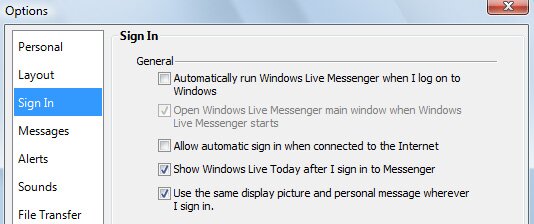
2. Choose Sign In, untick the Shows Windows Live Today after I sign in to Messenger button. (The 4th option under the General section) No more annoying pop-ups!



Thanks for advice.
Hello! Can you please tell me how can i stop the messenger window to pop up right on the screen?? If i am in the middle of somthing, it is really disturbing to have the text box for everyone to see! It used to be on previous version in the tab bar and it became blue when smb was trying to contact me.
I recently installed msn messenger. In playing around with it and learning it i discovered the scenes. I accidently deleted some of the 30 preinstalled scenes in thinking the red x in the upper right corner of each scene was to deactivate it. I would like to have them back. I tried to reinstall msn but it only gives me an option of installing what i didn’t install at the start. Is it possible to put a zip folder of the preinstalled scenes for us that may have accidently deleted scenes. I would greatly appreicate it. Thanks
This no longer works. I’ve got it unchecked on all 3 of my logins but the popup still shows. Maybe the newest version makes it harder to stop this popup I dunno. Using Windows 7.